# Type Check Your Django Application
Recently, I gave a talk, **Type Check your Django app** at two conferences - [Euro Python 2021](https://ep2021.europython.eu/talks/BsaKGk4-type-check-your-django-app/) and [PyCon India 2021](https://in.pycon.org/cfp/2021/proposals/type-check-your-django-app~ejRql/). The talk was about adding Python [gradual typing](http://mypy-lang.org/) to Django using third-party package [Django-stubs](https://github.com/TypedDjango/django-stubs) focussed heavily around [Django Models](https://docs.djangoproject.com/en/3.2/topics/db/models/). The blog post is the write-up of the talk. Here is the [unofficial link recorded video of the PyCon India talk](https://youtu.be/efs3RXaLJ4I).
Here is the link to [PyCon India Slides](https://slides.com/kracekumar/type-hints-in-django/fullscreen). The slides to [Euro Python Talk](https://slides.com/kracekumar/type-hints-in-django-euro-pycon-2021) (both slides are similar).
# Gradual Typing

Photo by [John Lockwood](https://unsplash.com/@justjohnl?utm_source=unsplash&utm_medium=referral&utm_content=creditCopyText) on [Unsplash](https://unsplash.com/s/photos/city-junction?utm_source=unsplash&utm_medium=referral&utm_content=creditCopyText)
Python from the 3.5 version onwards started supported optional static typing or gradual typing. Some parts of the source code contain type annotation, and some parts may have no type annotation. The python interpreter doesn't complain about the lack of type hints. The third-party library mypy does the type check.
Throughout the post, the source code example follows Python 3.8+ syntax and Django version 3.2. By default, static type checker refers to mypy, even though there are other type checkers like pyre from Facebook and pylance/pyright from Microsoft.
# Types

Photo by [Alexander Schimmeck](https://unsplash.com/@alschim?utm_source=unsplash&utm_medium=referral&utm_content=creditCopyText) on [Unsplash](https://unsplash.com/s/photos/many-objects?utm_source=unsplash&utm_medium=referral&utm_content=creditCopyText)
## Types at Run Time
```python
>>> type(lambda x: x)
>>> type(type)
>>> type(23)
>>> type(("127.0.0.1", 8000))
```
Python's in-built function [type](https://docs.python.org/3/library/functions.html#type) returns the type of the argument. When the argument is `("127.0.0.1", 8000)` the function returns type as tuple.
```python
>>>from django.contrib.auth.models import User
>>>type(User.objects.filter(
email='not-found@example.com'))
django.db.models.query.QuerySet
```
On a Django filter method result, type functions returns the type as `django.db.models.query.QuerySet`.
## Types at Static Checker Time
```python
addr = "127.0.0.1"
port = 8000
reveal_type((addr, port))
```
Similar to the `type` function, the static type checker provides `reveal_type` function returns the type of the argument during static type checker time. The function is not present during Python runtime but is part of mypy.
```python
$mypy filename.py
note: Revealed type is
'Tuple[builtins.str, builtins.int]'
```
The reveal_type returns the type of the tuple as `Tuple[builtins.str, builtins.int]`. **The reveal_type function also returns the type of tuple elements. In contrast, the type function returns the object type at the first level.**
```python
# filename.py
from django.contrib.auth.models import User
reveal_type(User.objects.filter(
email='not-found@example.com'))
```
```python
$ mypy filename.py
note: Revealed type is
'django.contrib.auth.models.UserManager
[django.contrib.auth.models.User]'
```
Similarly, on the result of Django's User object's filter method, `reveal_type` returns the type as `UserManager[User]`. Mypy is interested in the type of objects at all levels.
# Mypy config
```ini
# mypy.ini
exclude = "[a-zA-Z_]+.migrations.|[a-zA-Z_]+.tests.|[a-zA-Z_]+.testing."
allow_redefinition = false
plugins =
mypy_django_plugin.main,
[mypy.plugins.django-stubs]
django_settings_module = "yourapp.settings"
```
The [Django project](https://code.djangoproject.com/ticket/29299) does not contain type annotation in the source code and not in road map. Mypy needs information to infer the Django source code types. The mypy configuration needs to know the Django Stubs' entry point and the Django project's settings. Pass Django stub plugins to plugins variable and settings file location of the Django project to Django stubs plugin as `django_settings_module` variable in `mypy.plugins.django-stubs`.
# Annotation Syntax

Photo by [Lea Øchel](https://unsplash.com/@lealea_leaa?utm_source=unsplash&utm_medium=referral&utm_content=creditCopyText) on [Unsplash](https://unsplash.com/s/photos/jacket?utm_source=unsplash&utm_medium=referral&utm_content=creditCopyText)
```python
from datetime import date
# Example variable annotation
lang: str = "Python"
year: date = date(1989, 2, 1)
# Example annotation on input arguments
# and return values
def sum(a: int, b: int) -> int:
return a + b
class Person:
# Class/instance method annotation
def __init__(self, name: str, age: int,
is_alive: bool):
self.name = name
self.age = age
self.is_alive = is_alive
```
Type annotation can happen in three places.
1. During variable declaration/definition. Example: `lang: str = "Python"`. The grammar is `name: = `.
2. The function declaration with input arguments and return value types annotated. `sum(a: int, b: int) -> int`. The function `sum` input arguments annotation looks similar to variable annotation. The return value annotation syntax, `->` arrow mark followed by `return value type.` In sum function definition, it's `-> int`.
3. The method declaration. The syntax is similar to annotating a function. The `self` or `class` argument needs no annotation since mypy understand the semantics of the declaration. Except `__init__` method, when the function, method does return value, the explicit annotation should be `-> None` .
# Annotating Django Code
# Views
Django supports `class-based views` and `function-based views`. Since function and method annotations are similar, the example will focus on function-based views.
```python
from django.http import (HttpRequest, HttpResponse,
HttpResponseNotFound)
def index(request: HttpRequest) -> HttpResponse:
return HttpResponse("hello world!")
```
The view function takes in a `HttpRequest` and returns a `HttpResponse`. The annotating view function is straightforward after importing relevant classes from `django.http` module.
```python
def view_404(request:
HttpRequest) -> HttpResponseNotFound:
return HttpResponseNotFound(
'
')
# bad - not precise and not useful
def view_404(request: HttpRequest) -> object:
return HttpResponseNotFound(
'
Page not found
')
```
Here is another view function, `view_404`. The function returns `HttpResponseFound`- Http Status code 404. The return value annotation can take three possible values - `HttpResponseNotFound, HttpResponse, object`. The mypy accepts all three annotations as valid.
### Why and How? MRO
[Method Resolution Order(mro)](https://www.python.org/download/releases/2.3/mro/) is the linearization of multi-inheritance parent classes. To know the mro of a class, each class has a mro method.
```python
>>>HttpResponse.mro()
[django.http.response.HttpResponse,
django.http.response.HttpResponseBase,
object]
>>>HttpResponseNotFound.mro()
[django.http.response.HttpResponseNotFound,
django.http.response.HttpResponse,
django.http.response.HttpResponseBase,
object]
```
`HTTPResponseNotFound` inherits `HttpResponse`, `HTTPResponse` inherits `HttpResponseBase`, `HttpResponseBase` inherits `objects`.
### LSP - Liskov substitution principle
[Liskov substitution principle](https://en.wikipedia.org/wiki/Liskov_substitution_principle) states that in an object-oriented program, substituting a superclass object reference with an object of any of its subclasses, the program should not break.
`HTTPResponseNotFound` is a special class of `HTTPResponse` and `object`; hence mypy doesn't complain about the type mismatch.
## Django Models

Photo by [Jan Antonin Kolar](https://unsplash.com/@jankolar?utm_source=unsplash&utm_medium=referral&utm_content=creditCopyText) on [Unsplash](https://unsplash.com/s/photos/database?utm_source=unsplash&utm_medium=referral&utm_content=creditCopyText)
## Create
```python
from django.db import models
from django.utils import timezone
class Question(models.Model):
question_text = models.CharField(max_length=200)
pub_date = models.DateTimeField("date published")
def create_question(question_text: str) -> Question:
qs = Question(question_text=question_text,
pub_date=timezone.now())
qs.save()
return qs
```
`Question` is a Django model with two explicit fields: `question_text of CharField` and `pub_date of DateTimeField` . `create_question` is a simple function that takes in `question_text` as an argument and returns `Question` instance.
When the function returns an object, the return annotation should be the class's reference or the class's name as a string.
### Read
```python
def get_question(question_text: str) -> Question:
return Question.objects.filter(
question_text=question_text).first()
```
`get_question` takes a string as an argument and filters the Question model, and returns the first instance.
```python
error: Incompatible return value type
(got "Optional[Any]", expected "Question")
```
Mypy is unhappy about the return type annotation. The type checker says the return value can be None or Question instance. But the annotation is Question.
### Two solutions
```python
from typing import Optional
def get_question(question_text: str) -> Optional[Question]:
return Question.objects.filter(
question_text=question_text).first()
```
1. Annotate the return type to specify None value.
2. Typing module contains an `Optional` type, which means None. The return value Optional[Question] means None type or Question type.
```python
# mypy.ini
strict_optional = False
def get_question(question_text: str) -> Question:
return Question.objects.filter(
question_text=question_text).first()
```
By default, mypy runs in `strict mode`. `strict_optional` variable instructs mypy to ignore None type in the annotations(in the return value, in the variable assignment, ...). There are a lot of such [config variables mypy](https://mypy.readthedocs.io/en/stable/config_file.html#none-and-optional-handling) to run in the lenient mode.
The lenient configs values can help to get type coverage quicker.
### Filter method
```python
In [8]: Question.objects.all()
Out[8]: ,
]>
In [9]: Question.objects.filter()
Out[9]: ,
]>
```
Django object manager filter method returns a QuerySet and is iterable. All bulk read, and filter operations return Queryset. QuerySet carries the same model instances. It's a box type.

Photo by [Alexandra Kusper](https://unsplash.com/@alexandrakusper?utm_source=unsplash&utm_medium=referral&utm_content=creditCopyText) on [Unsplash](https://unsplash.com/s/photos/box-with-cup-cake?utm_source=unsplash&utm_medium=referral&utm_content=creditCopyText)
```python
def filter_question(text: str) -> QuerySet[Question]:
return Question.objects.filter(
text__startswith=text)
def exclude_question(text: str) -> QuerySet[Question]:
return Question.objects.exclude(
text__startswith=text)
```
Other object manager methods that return queryset are `all, reverse, order_by, distinct, select_for_update, prefetch_related, ...`
### Aggregate
```python
class Publisher(models.Model):
name = models.CharField(max_length=300)
class Book(models.Model):
name = models.CharField(max_length=300)
pages = models.IntegerField()
# use integer field in production
price = models.DecimalField(max_digits=10,
decimal_places=2)
rating = models.FloatField()
publisher = models.ForeignKey(Publisher)
pubdate = models.DateField()
```
The aggregate query is a way of summarizing the data to get a high-level understanding of the data. `Publisher` model stores the data of the book publisher with `name` as an explicit character field.
The `Book` model contains six explicit model fields.
- name - Character Field of maximum length 300
- `pages` - Integer Field
- `price` - Decimal Field
- rating - Decimal Field of maximum 10 digits and minimum 2 decimal digits
- publisher - Foreign Key to Publisher Field
- Pubdate - Date Field
```python
>>>def get_avg_price():
return Book.objects.all().aggregate(
avg_price=Avg("price"))
>>>print(get_avg_price())
{'avg_price': Decimal('276.666666666667')}
```
The function `get_avg_price` returns the average price of all the books. avg_price is a Django query expression in the aggregate method. From the `get_avg_price` function output, the output value is a dictionary.
```python
from decimal import Decimal
def get_avg_price() -> dict[str, Decimal]:
return Book.objects.all().aggregate(
avg_price=Avg("price"))
```
Type annotation is simple here. The return value is a `dictionary`. `dict[str, Decimal]` is the return type annotation. The first type of argument(`str`) in the dict specification is the dictionary's key's type. The second type of argument(`Decimal`) is the value of the key, `Decimal`.
### Annotate Method

Photo by [Joseph Pearson](https://unsplash.com/@josephtpearson?utm_source=unsplash&utm_medium=referral&utm_content=creditCopyText) on [Unsplash](https://unsplash.com/collections/47883473/old-things?utm_source=unsplash&utm_medium=referral&utm_content=creditCopyText)
[From Django doc's on annotate queryset method](https://docs.djangoproject.com/en/3.2/ref/models/querysets/#annotate)
> Annotates each object in the `QuerySet` with the provided list of [query expressions](https://docs.djangoproject.com/en/3.2/ref/models/expressions/). An expression may be a simple value, a reference to a field on the model (or any related models), or an aggregate expression (averages, sums, etc.) that has been computed over the objects that are related to the objects in the `QuerySet`.
```python
def count_by_publisher():
return Publisher.objects.annotate(
num_books=Count("book"))
def print_pub(num_books=0):
if num_books > 0:
res = count_by_publisher().filter(
num_books__gt=num_books)
else:
res = count_by_publisher()
for item in res:
print(item.name, item.num_books)
```
The `count_by_publisher` function counts the books published by the publisher. The `print_pub function` filters the publisher count based on the num_book function argument and prints the result.
```python
>>># after importing the function
>>>print_pub()
Penguin 2
vintage 1
```
`print_pub` prints publication house name and their books count. Next is adding an annotation to both the function.
```python
from typing import TypedDict
from collections.abc import Iterable
class PublishedBookCount(TypedDict):
name: str
num_books: int
def count_by_publisher() ->
Iterable[PublishedBookCount]:
...
```
`count_by_publisher` returns more than one value, and the result is iterable. `TypedDict` is useful when the dictionary contents keys are known in advance. The attribute names of the class are the key names(should be a string), and the value type is an annotation to the key. `count_by_publisher` 's annotation is `Iterable[PublishedBookCount]`.
```bash
$# mypy output
scratch.py:46: error: Incompatible return value
type (got "QuerySet[Any]", expected
"Iterable[PublishedBookCount]")
return Publisher.objects.annotate(
num_books=Count("book"))
^
scratch.py:51: error:
"Iterable[PublishedBookCount]" has no attribute "filter"
res = count_by_publisher().filter(
num_books__gt=num_books)
```
The mypy found out two errors.
1. error: Incompatible return value type (got "QuerySet[Any]", expected "Iterable[PublishedBookCount]")
Mypy says the `.annotate` method returns `QuerySet[Any]` whereas annotation says return type as `Iterable[PublishedBookCount]`.
2. "Iterable[PublishedBookCount]" has no attribute "filter"
`print_pub` uses return value from `count_by_publisher` to filter the values. Since the return value is iterable and the filter method is missing, mypy complains.
### How to fix these two errors?
```python
def count_by_publisher() -> QuerySet[Publisher]:
...
def print_pub(num_books: int=0) -> None:
...
for item in res:
print(item.name, item.num_books)
```
Modify the return value annotation for `count_by_publisher` to `QuerySet[Publisher]` as suggested by mypy. Now the first error is fixed, but some other error.
```bash
# mypy output
$mypy scratch.py
scratch.py:55: error: "Publisher" has
no attribute "num_books"
print(item.name, item.num_books)
```
Django dynamically adds the `num_books` attribute to the return QuerySet. The publisher model has one explicitly declared attribute name, and `num_books` is nowhere declared, and mypy is complaining.
[This was a bug in Django Stubs project and got fixed recently.](https://github.com/typeddjango/django-stubs/pull/398) The newer version of Django stubs provides a nice way to annotate the function.
### Option 1 - Recommended
```python
from django_stubs_ext import WithAnnotations
class TypedPublisher(TypedDict):
num_books: int
def count_by_publisher() -> WithAnnotations[Publisher, TypedPublisher]:
...
```
`WithAnnotation` takes two argument `the model` and `TypedDict` with on the fly fields.
### Option 2 - Good solution
Another solution is to create a new model `TypedPublisher` inside `TYPE_CHECKING` block, which is only visible to mypy during static type-checking time. The `TypedPublisher` inherits `Publisher` model and declares the `num_books ` attribute as Django field, Then mypy will not complain about the missing attribute.
```python
from typing import TYPE_CHECKING
if TYPE_CHECKING:
class TypedPublisher(Publisher):
num_books = models.IntegerField()
class meta:
abstract = True
def count_by_publisher() -> QuerySet[TypedPublisher]:
return Publisher.objects.annotate(
num_books=Count("book"))
def print_pub(num_books: int=0) -> None:
if num_books > 0:
res = count_by_publisher().filter(
num_books__gt=num_books)
else:
res = count_by_publisher()
for item in res:
print(item.name, item.num_books)
```
The earlier solution is elegant and works with simple data-types, which group by/annotate returns.
# Tools

Board Photo by [Nina Mercado](https://unsplash.com/@nina_mercado?utm_source=unsplash&utm_medium=referral&utm_content=creditCopyText) on [Unsplash](https://unsplash.com/s/photos/tool-box?utm_source=unsplash&utm_medium=referral&utm_content=creditCopyText)
It's hard to start annotation when the project has a significant amount of code because of the surface area and topics to learn. Except for Django ORM, most of the custom code in the project will be Python-specific data flow.
## Pyannotate
[Pyannotate](https://github.com/dropbox/pyannotate) is a tool to auto-generate type hints for a given Python project. Pyannotate captures the static types during execution code and writes to an annotation file. [Pytest-annotate](https://pypi.org/project/pytest-annotate/) is a pytest plugin to infer types during test time. In the anecdotal micro-benchmark, because of pytest-annotate, the tests take 2X time to complete.
### Phase 0 - Preparation
```python
from django.http import (HttpResponse,
HttpResponseNotFound)
# Create your views here.
# annotate the return value
def index(request):
return HttpResponse("hello world!")
def view_404_0(request):
return HttpResponseNotFound(
'
Page not found
')
```
Here is a simple python file with no type annotations.
```python
from polls.views import *
from django.test import RequestFactory
def test_index():
request_factory = RequestFactory()
request = request_factory.post('/index')
index(request)
def test_view_404_0():
request_factory = RequestFactory()
request = request_factory.post('/404')
view_404_0(request)
```
Then add relevant test cases for the files.
### Phase 1 - Invoking Pyannotate
```bash
$DJANGO_SETTINGS_MODULE="mysite.settings" PYTHONPATH='.' poetry run pytest -sv polls/tests.py --annotate-output=./annotations.json
```
While running the pytest pass extra option, `--annotate-ouput` to store the inferred annotations.
### Phase 2 - Apply the annotations
```json
$cat annotations.json
[...
{
"path": "polls/views.py",
"line": 7,
"func_name": "index",
"type_comments": [
"(django.core.handlers.wsgi.WSGIRequest) ->
django.http.response.HttpResponse"
],
"samples": 1
},
{
"path": "polls/views.py",
"line": 10,
"func_name": "view_404_0",
"type_comments": [
"(django.core.handlers.wsgi.WSGIRequest) ->
django.http.response.HttpResponseNotFound"
],
"samples": 1
}
]
```
After running the test, `annotations.json` file contains the inferred annotations.
```bash
$poetry run pyannotate --type-info ./annotations.json -w polls/views.py --py3
```
Now, apply the annotations from the `annotations.json` to the source code in `pools/views.py`. `--py3` flag indicates, the type-annotations should follow Python 3 syntax.
```python
from django.http import HttpResponse, HttpResponseNotFound
from django.core.handlers.wsgi import WSGIRequest
from django.http.response import HttpResponse
from django.http.response import HttpResponseNotFound
def index(request: WSGIRequest) -> HttpResponse:
return HttpResponse("hello world!")
def view_404_0(request: WSGIRequest) -> HttpResponseNotFound:
return HttpResponseNotFound('
Page not found
')
```
After applying the annotations, the file contains the available annotations and required imports.
One major shortcoming of pyannotate is `types` at test time, and runtime can be different. Example: Dummy Email Provider. That's what happened in the current case. Django tests don't use HTTPRequest, and the tests use `WSGIRequest` the request argument type annotation is WSGIRequest.
For edge cases like these, `pyannotate` is better(run Django server as part of pyannotate) and infers the type correctly.
## Python Typing Koans

Photo by [John Lockwood](https://unsplash.com/@justjohnl?utm_source=unsplash&utm_medium=referral&utm_content=creditCopyText) on [Unsplash](https://unsplash.com/s/photos/city-junction?utm_source=unsplash&utm_medium=referral&utm_content=creditCopyText)
Demo
[Python Typing Koans repository](https://github.com/kracekumar/python-typing-koans) contains the standalone python programs to learn gradual typing in Python. The programs contain partial or no type hints. The learner will understand how type-checkers evaluate the types by adding type hints and fixing the existing type hints error.
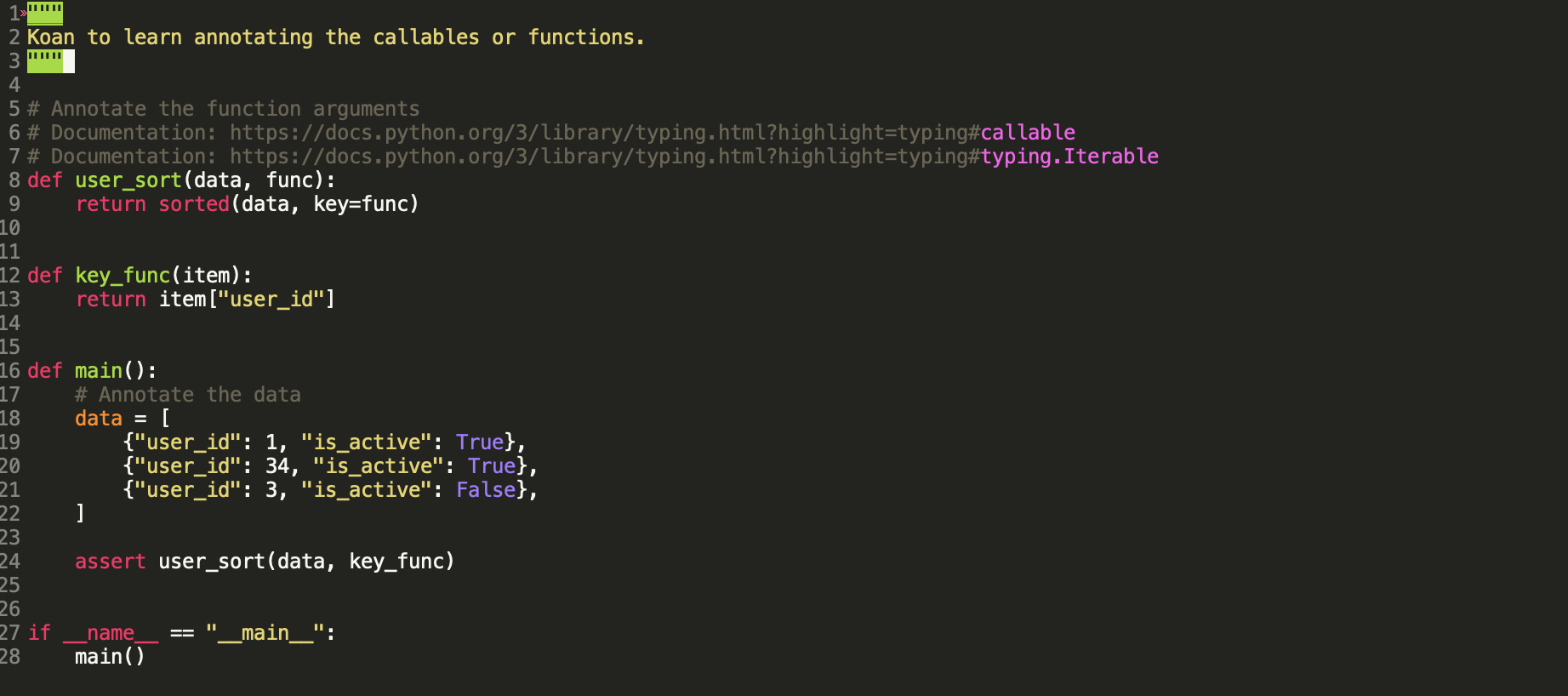
The project contains koans for Python, Django, and Django Rest Framework. By removing the errors in each file, the learner will understand the typing concepts.
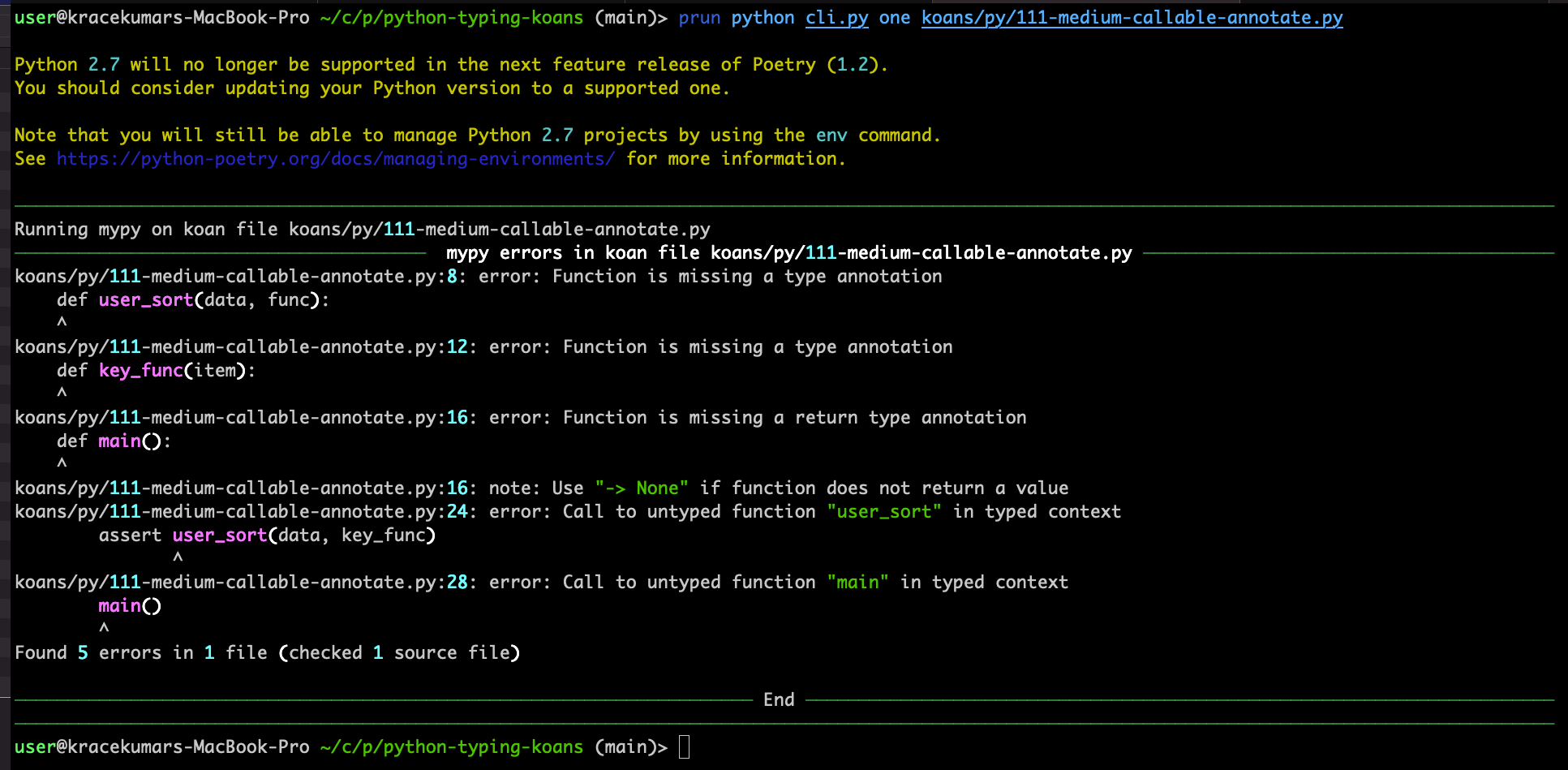
[The detailed write up about the project in the blog post.](https://kracekumar.com/post/python-typing-koans/)
# Conclusion
**Disclaimer**: Gradual Typing is evolving and not complete yet. For example, it's still hard to annotate decorators(python 3.10 release should make it easier), so it's hard to annotate all dynamic behaviors. Adding type-hints to a project comes with its own cost, and not all projects would need it.
I hope you learned about Python Django, and if you're using type-hints, I'd like to hear about it.
If you're struggling with type-hints in your projects or need some advice I'll be happy to offer. Shoot me an email!
[Found a bug or typo, and have spare time to fix, send a PR and the file is here!](https://gitlab.com/kracekumar/kracekumar.gitlab.io/-/blob/master/content/post/type_check_your_django_app.md)
### References
1. Euro PyCon - https://ep2021.europython.eu/talks/BsaKGk4-type-check-your-django-app/
2. PyCon India - https://in.pycon.org/cfp/2021/proposals/type-check-your-django-app~ejRql/
3. Mypy - http://mypy-lang.org/
4. Django Stub - https://github.com/TypedDjango/django-stubs
5. Django Models - https://docs.djangoproject.com/en/3.2/topics/db/models/
6. Video recording - https://youtu.be/efs3RXaLJ4I
7. PyCon India Slides - https://slides.com/kracekumar/type-hints-in-django/fullscreen
8. LSP - https://en.wikipedia.org/wiki/Liskov_substitution_principle
9. Method Resolution Order - https://www.python.org/download/releases/2.3/mro/
10. Mypy Config variables - https://mypy.readthedocs.io/en/stable/config_file.html#none-and-optional-handling
11. Django Stubs Annotate fix - https://github.com/typeddjango/django-stubs/pull/398
12. Pyannotate - https://github.com/dropbox/pyannotate
13. Pytest-annotate - https://pypi.org/project/pytest-annotate/
14. Python Typing Koans - https://github.com/kracekumar/python-typing-koans
15. Python Typing Koans blog post - https://kracekumar.com/post/python-typing-koans
### Images References
- Fruits Photo by [Alexander Schimmeck](https://unsplash.com/@alschim?utm_source=unsplash&utm_medium=referral&utm_content=creditCopyText) on [Unsplash](https://unsplash.com/s/photos/many-objects?utm_source=unsplash&utm_medium=referral&utm_content=creditCopyText)
- Highway Photo by [John Lockwood](https://unsplash.com/@justjohnl?utm_source=unsplash&utm_medium=referral&utm_content=creditCopyText) on [Unsplash](https://unsplash.com/s/photos/city-junction?utm_source=unsplash&utm_medium=referral&utm_content=creditCopyText)
- Leather Jacket Photo by [Lea Øchel](https://unsplash.com/@lealea_leaa?utm_source=unsplash&utm_medium=referral&utm_content=creditCopyText) on [Unsplash](https://unsplash.com/s/photos/jacket?utm_source=unsplash&utm_medium=referral&utm_content=creditCopyText)
- Cup cake Photo by [Alexandra Kusper](https://unsplash.com/@alexandrakusper?utm_source=unsplash&utm_medium=referral&utm_content=creditCopyText) on [Unsplash](https://unsplash.com/s/photos/box-with-cup-cake?utm_source=unsplash&utm_medium=referral&utm_content=creditCopyText)
- Tool Board Photo by [Nina Mercado](https://unsplash.com/@nina_mercado?utm_source=unsplash&utm_medium=referral&utm_content=creditCopyText) on [Unsplash](https://unsplash.com/s/photos/tool-box?utm_source=unsplash&utm_medium=referral&utm_content=creditCopyText)
- Store Photo by [Jan Antonin Kolar](https://unsplash.com/@jankolar?utm_source=unsplash&utm_medium=referral&utm_content=creditCopyText) on [Unsplash](https://unsplash.com/s/photos/database?utm_source=unsplash&utm_medium=referral&utm_content=creditCopyText)
- Knot Photo by [John Lockwood](https://unsplash.com/@justjohnl?utm_source=unsplash&utm_medium=referral&utm_content=creditCopyText) on [Unsplash](https://unsplash.com/s/photos/city-junction?utm_source=unsplash&utm_medium=referral&utm_content=creditCopyText)
- Records Photo by [Joseph Pearson](https://unsplash.com/@josephtpearson?utm_source=unsplash&utm_medium=referral&utm_content=creditCopyText) on [Unsplash](https://unsplash.com/collections/47883473/old-things?utm_source=unsplash&utm_medium=referral&utm_content=creditCopyText)
# Discussions
1. Lobste.rs - https://lobste.rs/s/exvuuc/type_check_your_django_application
2. Hacker News - https://news.ycombinator.com/item?id=28640033
3. Reddit - [r/python](https://www.reddit.com/r/Python/comments/pufsg7/type_check_your_django_app/) and [r/Django](https://www.reddit.com/r/django/comments/pufsxm/type_check_your_django_application/)
4. Twitter Thread - https://twitter.com/kracetheking/status/1441329460754595846
 # Views
Django supports `class-based views` and `function-based views`. Since function and method annotations are similar, the example will focus on function-based views.
```python
from django.http import (HttpRequest, HttpResponse,
HttpResponseNotFound)
def index(request: HttpRequest) -> HttpResponse:
return HttpResponse("hello world!")
```
The view function takes in a `HttpRequest` and returns a `HttpResponse`. The annotating view function is straightforward after importing relevant classes from `django.http` module.
```python
def view_404(request:
HttpRequest) -> HttpResponseNotFound:
return HttpResponseNotFound(
'
# Views
Django supports `class-based views` and `function-based views`. Since function and method annotations are similar, the example will focus on function-based views.
```python
from django.http import (HttpRequest, HttpResponse,
HttpResponseNotFound)
def index(request: HttpRequest) -> HttpResponse:
return HttpResponse("hello world!")
```
The view function takes in a `HttpRequest` and returns a `HttpResponse`. The annotating view function is straightforward after importing relevant classes from `django.http` module.
```python
def view_404(request:
HttpRequest) -> HttpResponseNotFound:
return HttpResponseNotFound(
'